


This feature helps ensure every quote starts with the right playbook by automatically selecting it based on information already stored in your CRM. When a quote is created or opened, DealHub uses the opportunity details to choose the most relevant playbook, keeping your sales process aligned and consistent.
How it works
You can choose which CRM field should determine the playbook. Once set, DealHub reads that value when a quote is created and uses it to select the matching playbook. If the value is missing or doesn’t match an existing playbook, the system guides the user to choose from available options.
Key capabilities
Automatic Playbook Selection
Saves time by selecting the right playbook for each quote without manual input.
Clear Guidance When Needed
If something doesn’t match, users receive clear messages and can easily choose the correct playbook.
Flexible Fallback Options
When no match is found, users can select from available playbooks to keep the process moving.
How to configure
- Turn On the Feature: Enable this by asking it from your CSM or DealHub Support
- Choose Your CRM Field
Salesforce: Control Panel → Version Settings → Advanced Settings → Salesforce Settings → Input Fields Mapping
Select “Quote default playbook is based on:”
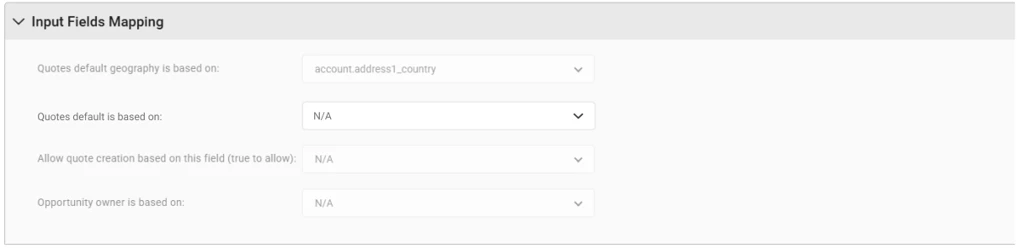
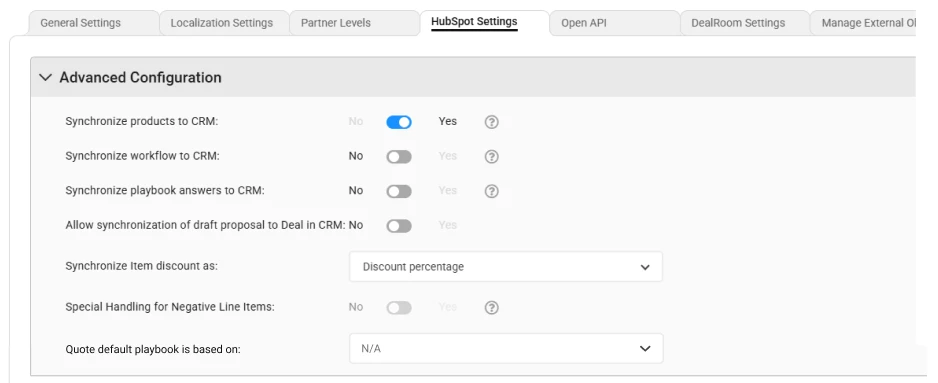
HubSpot / Microsoft Dynamics: Control Panel → Version Settings → Advanced Settings → HubSpot Settings → Advanced Configuration
Select “Quote default playbook is based on:”
Setup Requirement
Select a CRM field that contains the playbook name you want to use.
What’s in it for me?
Save Time
Reduce manual steps by automatically selecting the right playbook.
Stay Consistent
Keep your CRM and DealHub aligned for a smoother sales process.
Reduce Errors
Avoid incorrect playbook selection with built-in checks and helpful guidance.